


The Amazon Fire TV Stick remote is packed with hidden button combinations that can save time, troubleshoot issues, and unlock advanced features. These shortcuts work on most recent Fire TV remotes (including Alexa Voice Remotes for Fire TV Stick 4K, 4K Max, and others as of 2026). Here’s a visual of a typical remote for reference:


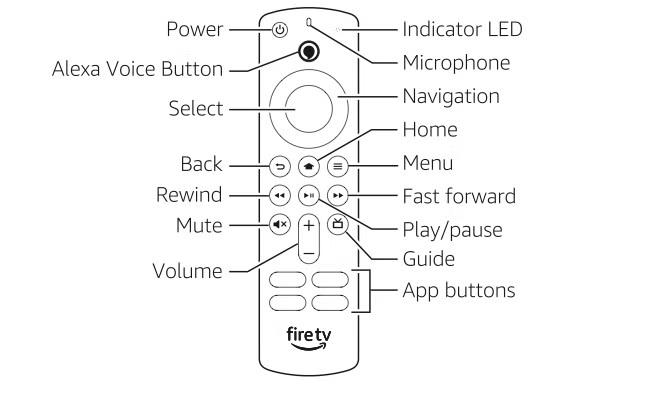
1. Quick Access Menu
Shortcut: Press and hold the Home button for 3-5 seconds. This overlays a handy menu with shortcuts to Sleep, Mirroring, Settings, Apps, and more—without exiting your current app or show.
2. Restart Your Firestick
Shortcut: Press and hold Select (center button) + Play/Pause for 5-10 seconds. Perfect for fixing freezes or lag; it reboots the device quickly without unplugging.
3. Cycle Through Resolutions
Shortcut: Press and hold Up (navigation) + Rewind for 5-10 seconds. Displays the current resolution/refresh rate and cycles through all supported options on your TV (including lower ones like 480p or different Hz rates for better compatibility).
4. Factory Reset
Shortcut: Press and hold Back + Right (navigation ring) for 10 seconds. Initiates a full factory reset—useful if the device is unresponsive and you can’t access settings (wipes all data).
5. Enable/Disable Screen Magnifier
Shortcut: Press and hold Back + Fast Forward for a few seconds. Toggles the zoom feature for better visibility of small text or UI elements; once on, you can pan and zoom.
6. Toggle Text Banner (Closed Captions Style)
Shortcut: Press and hold Rewind + Fast Forward for 2 seconds. Turns on/off the descriptive text banner for audio cues (great for accessibility).
7. Pair/Unpair Remote
Shortcut: Press and hold Home for 10 seconds. Forces pairing mode if your remote loses connection.
8. Reset the Remote Itself
Shortcut: Press and hold Left (navigation) + Menu (three lines) + Back for 12 seconds. Resets an unresponsive remote; useful before re-pairing.
9. Access Advanced Picture Calibration
Shortcut: Press and hold Select + Down for 3-4 seconds, then press Menu. Opens a hidden menu for professional picture adjustments (like white balance).
10. Force Sleep Mode
Shortcut: From the Quick Menu (hold Home), select Sleep—or hold Home longer in some cases. Puts the device to sleep instantly to save power.
These shortcuts can transform how you use your Fire TV Stick, making navigation faster and troubleshooting easier. Note that exact behavior may vary slightly by remote model or software version—test them out! If issues persist, check Amazon’s settings or restart. Enjoy smoother streaming!

